How Say It For Me Works
Say It For Me helps people who cannot speak or need help speaking clearly and quickly. Two modes keep conversations moving: Start Listen and Start Talk.

- Start Listen captures the other person's words.
- AI suggests responses you can speak instantly.
- Start Talk helps you begin a conversation.
Start Listen example
The app transcribes what someone says and offers fast, clear responses.
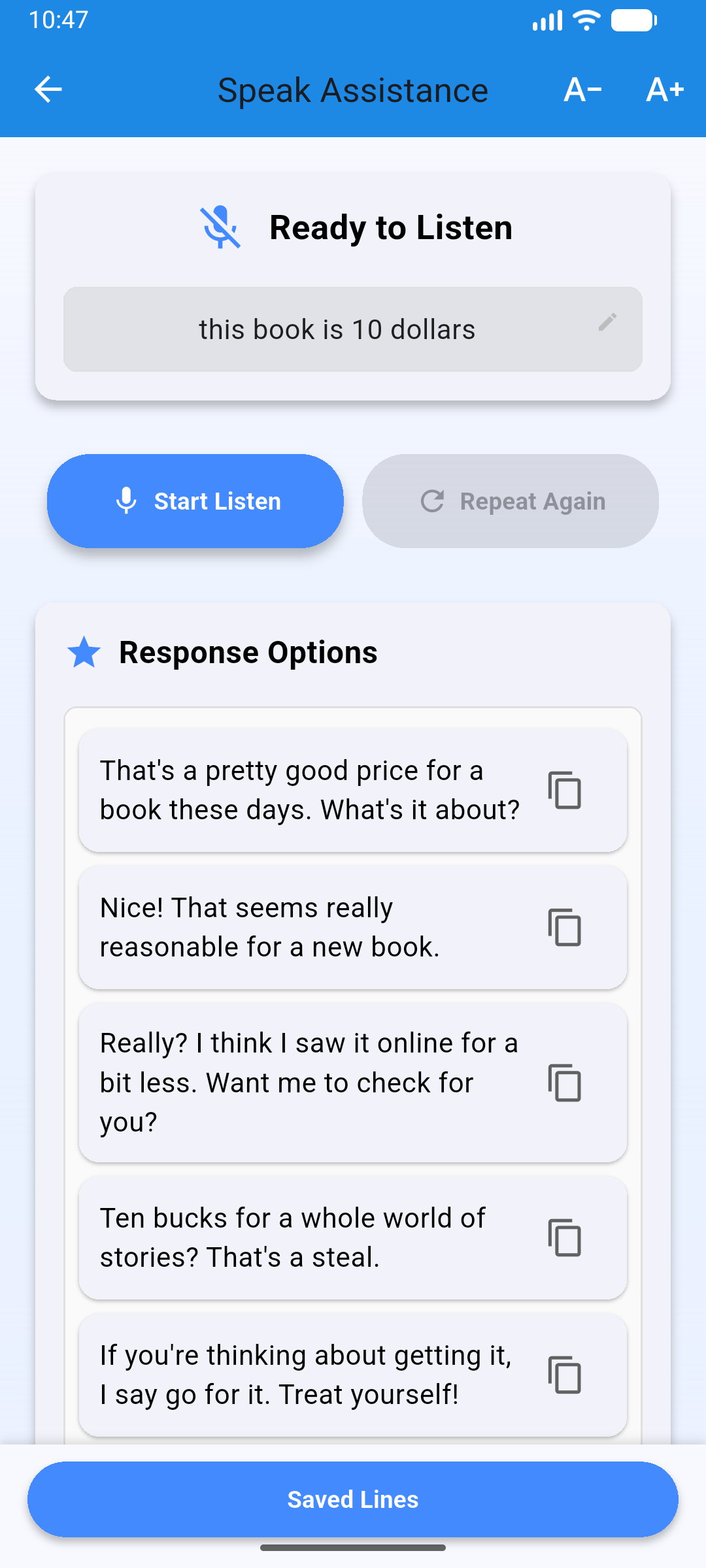
From speech to response
Start Listen transcribes the other person and highlights key intent.
Tap a suggested reply and the app speaks it clearly.
Start Listen: respond in seconds
Use Start Listen when someone is talking to you. The app transcribes the speech, understands the context, and offers quick responses that you can speak with one tap.
Start Talk: begin a conversation
Use Start Talk when you want to speak first. Type or select a short phrase and let the app speak it clearly.
AI response suggestions
Short, context-aware responses keep the conversation natural.
Text-to-speech voice
Choose voice speed, pitch, and language for comfortable communication.
Real-time flow
Designed for everyday conversations with minimal waiting time.
Quick Steps
- Open Say It For Me and choose Start Listen or Start Talk.
- Select a suggested response or type a short phrase.
- Tap to speak out loud and continue the conversation.
- Adjust voice speed, pitch, and language when needed.
Important Notes
Not a medical device
Say It For Me is a communication assistant and is not a medical device.
Not for emergencies
Use local emergency services for urgent situations.
Everyday use
Best for daily conversations at home, school, work, and in the community.